Showing posts with label Remove Attribution in Blogger. Show all posts

How to remove template and publisher name from blogger blog ? Quick Steps

Attribution in blogger can be removed very easily if you follow these steps :
  •  Login to blogger.com 
  • Go to Design and then Edit HTML
Click to enlarge , Design
Click to enlarge , Edit HTML
  •  By using your browser search CTRL+F , in the text area find for <b:widget id='Attribution1' and then after that you will find locked='true' make it locked='false' , click SAVE TEMPLATE
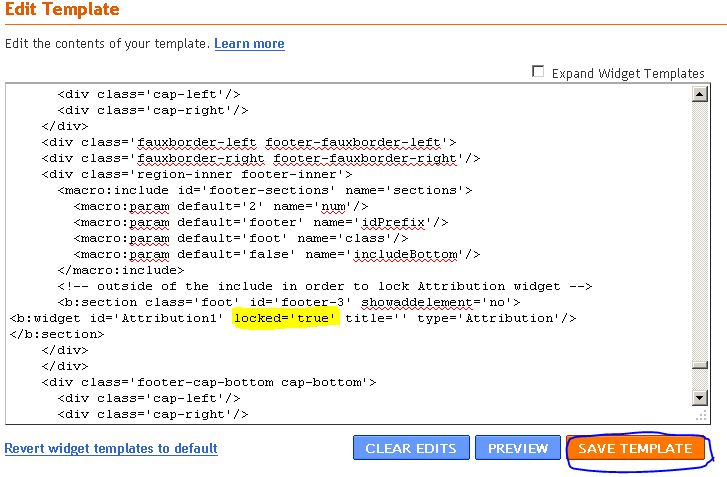
Click to enlarge , the highlighted code is what you have to modify
  • Here is the modified image after making locked='false'
Click to enlarge , locked='false' ( modified )
  • And then , go to Design and then click Attribution - Edit and then click REMOVE
  • Thats it , the attribution is removed !

How to remove Powered By Blogger from your blog ?

Attribution in blogger can be removed very easily if you follow these steps :
  •  Login to blogger.com 
  • Go to Design and then Edit HTML
Click to enlarge , Design
Click to enlarge , Edit HTML
  •  By using your browser search CTRL+F , in the text area find for <b:widget id='Attribution1' and then after that you will find locked='true' make it locked='false' , click SAVE TEMPLATE
Click to enlarge , the highlighted code is what you have to modify
  • Here is the modified image after making locked='false'
Click to enlarge , locked='false' ( modified )
  • And then , go to Design and then click Attribution - Edit and then click REMOVE
  • Thats it , the attribution is removed !

How to remove attribution from blogger ?

Attribution in blogger can be removed very easily if you follow these steps :
  •  Login to blogger.com 
  • Go to Design and then Edit HTML
Click to enlarge , Design
Click to enlarge , Edit HTML
  •  By using your browser search CTRL+F , in the text area find for <b:widget id='Attribution1' and then after that you will find locked='true' make it locked='false' , click SAVE TEMPLATE
Click to enlarge , the highlighted code is what you have to modify
  • Here is the modified image after making locked='false'
Click to enlarge , locked='false' ( modified )
  • And then , go to Design and then click Attribution - Edit and then click REMOVE
  • Thats it , the attribution is removed !